Editable Dream Job Explorer Planner
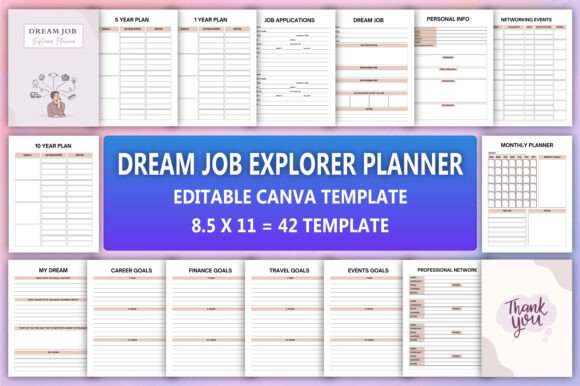
If you’ve ever felt pulled in ten directions—juggling career ambitions, financial targets, personal growth, and daily responsibilities—you’re not alone. The Editable Dream Job Explorer Planner isn’t just another digital notebook. It’s a thoughtfully structured, all-in-one life and career navigation system designed for adults who want clarity without complexity—and flexibility without compromise.
What makes it different? Unlike static PDF planners or fragmented apps, this tool gives you full control: edit every page in Canva using a free account, customize colors and fonts, rearrange sections, and tailor content to your exact needs—from landing your dream job to tracking sleep, income, or quarterly achievements. You’ll receive high-resolution PDF, JPEG, and PNG files—ready for printing, sharing, or digital use—plus an editable Canva link that opens instantly.
Common Missteps People Make With Digital Planners
Many users download an Editable Dream Job Explorer Planner expecting instant transformation—only to stall within days. Why? Not because the planner is flawed, but because they overlook how it’s meant to be used.
One frequent mistake is treating it like a rigid checklist rather than a living document. People fill out “My Dream Job” once and never revisit it—even as their values, skills, or market conditions shift. Another oversight: skipping the “Wheel of Life” or “Self-Care Tracker” pages, assuming those are “optional extras.” In reality, burnout and misaligned goals often stem from neglecting holistic balance—not just career planning.
Some assume editing requires design experience. That’s not true. Canva’s drag-and-drop interface means changing text, swapping icons, or adjusting layouts takes seconds—not hours. Yet many users avoid editing altogether, sticking with default wording like “Job Applications” instead of personalizing it to “Tech Sales Roles I’m Targeting (Q3 2024).” Generic language dilutes focus and reduces accountability.
Why File Quality Matters More Than You Think
You’ll get PDF, JPG, and PNG files—but not all formats serve the same purpose. A low-res JPEG might look fine on a phone screen, but if you print it or project it during a team meeting, blurry text or pixelated trackers undermine credibility and usability. That’s why this planner delivers high-quality, print-ready PDFs with crisp typography and properly embedded fonts—no missing characters or layout shifts.
Similarly, relying solely on the Canva link without downloading backups is risky. While Canva saves changes automatically, unexpected logouts, browser issues, or account limits can interrupt workflow. Smart users download the PDF and PNG versions first—then use Canva for ongoing edits. That way, you always have a stable, portable version on hand.
What to Check Before You Customize or Commit
Before diving into edits, pause and ask three practical questions:
- What’s my primary goal right now? Is it landing interviews? Building a professional network? Managing energy alongside workload? Start by highlighting just 2–3 core sections—like “Interview Preparation,” “Networking Events,” and “Monthly Achievements”—rather than trying to populate every tracker at once.
- How will I review progress? A planner only works if it’s revisited. Build in light rituals: 10 minutes every Sunday to update your “Chore Chart” and “Daily Food Journal,” or 20 minutes monthly to reflect in “Dream Notes” and adjust your “1-Year Plan.”
- Where does friction live? If you consistently skip the “Expense Tracker,” don’t blame yourself—blame the setup. Maybe it’s too detailed. Try simplifying it to three categories: Essentials, Growth Investments (courses, conferences), and Joy Spending. Realistic design beats idealized structure every time.
Better Ways to Use the Planner—Without Overwhelm
Think of the Editable Dream Job Explorer Planner as modular—not monolithic. You don’t need all 50+ pages active at once. A freelance graphic designer might prioritize “Current Projects,” “Project Planner,” and “Income Tracker,” while pausing “Grocery List” or “Travel Goals” until later. An educator shifting into edtech could spotlight “Professional Network,” “Job Website Logins,” and “Performance Review Planner”—then layer in “Habit Tracker” once routines stabilize.
Also, avoid copying templates blindly. That “5-Year Plan” page isn’t about predicting the future—it’s about identifying directional anchors. Instead of writing “Become VP by 2029,” try: “Build expertise in AI ethics by leading two cross-functional initiatives; deepen relationships with three mentors in regulated tech sectors.” Specificity invites action. Vagueness invites delay.
Real-World Adjustments That Stick
Here’s what works for people who sustain momentum:
- Batch-edit once, then protect your time. Spend 45 minutes customizing fonts, colors, and section order in Canva—then lock that layout. Future edits should focus on content, not design.
- Use the “Thank You” file intentionally. It’s not just a formality. Print it, sign it, and keep it where you’ll see it daily—on your desk or laptop lid. Gratitude grounds ambition.
- Pair trackers with micro-rewards. Completing your “Sleep Tracker” for seven nights? That earns a 20-minute walk without screens—not a $50 splurge. Small, aligned rewards reinforce consistency better than grand gestures.
The Editable Dream Job Explorer Planner succeeds when it reflects *you*—not a generic ideal. It’s not about perfection in planning. It’s about intention in practice. Whether you’re reentering the workforce after caregiving, pivoting careers at 42, launching a side hustle, or simply craving more coherence between your daily tasks and long-term vision—this planner meets you where you are. Edit freely. Print confidently. Track honestly. And remember: the most powerful version isn’t the prettiest one—it’s the one you actually use, week after week, with quiet confidence.