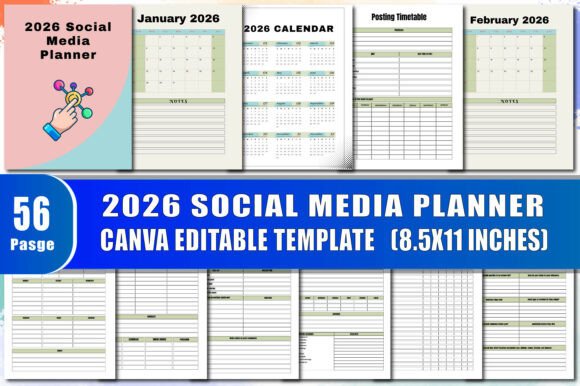
2026 Social Media Planner
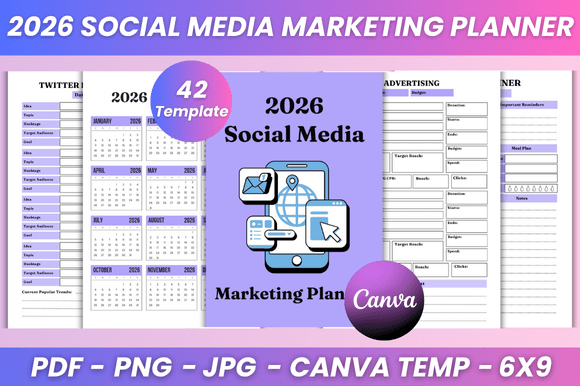
Planning your social media content doesn’t have to mean juggling dozens of tabs, forgetting key dates, or scrambling last-minute before a holiday post goes live. The 2026 Social Media Planner is a thoughtfully designed, all-in-one tool built for real-world use—whether you’re launching your first blog, managing a small business page, growing a creative portfolio, or handling multiple client accounts.
It’s more than just a calendar. Think of it as your organized command center for the entire year ahead—structured yet flexible, detailed yet intuitive. Every section supports a specific part of your workflow, from brainstorming post ideas to reviewing analytics, scheduling stories, tracking ad spend, and even remembering login details securely.
What Makes This Planner Different?
Unlike generic notebooks or basic digital templates, the 2026 Social Media Planner is purpose-built for creators and professionals who need clarity without complexity. Its interior is fully editable in Canva—so you can personalize colors, fonts, icons, and layouts to match your brand or mood. Want a calming lavender theme for your wellness page? Done. Prefer bold, high-contrast visuals for your tech newsletter? Easy. You’re not locked into someone else’s design—you own the look and feel.
And because it’s delivered as high-quality, print-ready PDF files, you get crisp, professional results whether you’re printing at home, ordering a bound copy, or preparing it for Amazon KDP. No blurry text, no misaligned grids—just clean, consistent formatting across every page.
How It Fits Into Your Daily Workflow
Let’s say you run a handmade jewelry shop on Instagram and Pinterest. In January 2026, you’d use the Monthly Review page to reflect on December’s top-performing pins, then flip to the Pinterest Board Planner to map out new boards for Valentine’s Day campaigns. Next, you’d draft three caption variations in the Post Content Planner, log relevant hashtags in the Hashtag Manager, and schedule posts using the Posting Timetable.
Or imagine you’re a freelance graphic designer building your personal brand. You could use the Video Planner to outline quarterly YouTube tutorials, track client deadlines in the Task Chart, and keep LinkedIn content fresh with the Linkedin Content section—all while referencing the built-in 2026 Calendar and Name of Holiday list to time seasonal offers just right.
Features That Actually Get Used
This planner includes over 40 practical sections—no filler, no “nice-to-haves” that gather dust. Here’s how some of them work in real life:
- Daily Planner: Block time for writing, editing, engagement, and rest—not just posting.
- Instagram Stories Tracker: Note which polls, quizzes, or countdowns performed best each week.
- Facebook Advertising Tracker: Log budget, audience size, CTR, and ROI side-by-side with campaign goals.
- Pinterest Stats Analysis: Record impressions, saves, and outbound clicks to spot trends before they go viral.
- Password Tracker: Store login info safely (offline, if preferred) with space for notes like “use 2FA” or “reset needed.”
- Find Your Tribe: Jot down communities, hashtags, or creators you want to engage with monthly—not just follow, but connect.
Even the small touches matter: the This Book Belongs To page helps avoid mix-ups in shared workspaces, and the Belongs To Page adds a personal touch if gifting or reselling.
Who Benefits Most—and Why
Beginners appreciate how clearly each section guides them—from “what’s a series planner?” to “how do I batch-create content?”—without assuming prior knowledge. Busy educators use the Content Weekly layout to align posts with lesson plans. Freelancers rely on the Youtube planner and Video Planner to coordinate filming, editing, and publishing around client work. Small business owners love the Facebook content schedule and Instagram Advertising pages for staying consistent without burnout.
It’s also ideal for teams. Print one copy per person, or share the Canva file and collaborate in real time—updating colors, adding internal notes, or adjusting deadlines as priorities shift.
Things to Keep in Mind Before You Start
First, this isn’t a magic fix—it works best when paired with intention. Spend 10 minutes each Sunday reviewing the past week and planning the next. Second, the Canva-editable version gives you full control, but requires a free Canva account. Third, while the PDFs are print-ready, double-check your printer settings for best results (especially for color-heavy pages like the Post Ideas spread).
If you plan to publish on Amazon KDP, the files include proper bleed, margins, and CMYK-ready design—so your paperback version looks polished, not pixelated. And since every month from January 2026 through December 2026 is included—with holidays clearly marked—you won’t miss a single cultural moment or seasonal opportunity.
A Tool That Grows With You
The 2026 Social Media Planner meets you where you are: whether you post once a week or manage five platforms daily. It doesn’t pressure you to be everywhere—it helps you choose where to show up meaningfully. You can delete unused sections, duplicate your favorite spreads, or add custom pages in Canva. There’s no “right” way to use it—only the way that helps you stay focused, creative, and calm amid the noise.
At its core, this planner is about reducing friction so your energy goes toward creating—not organizing. And when your tools feel intuitive, aligned with your goals, and easy to adapt, consistency stops feeling like a chore and starts feeling like momentum.