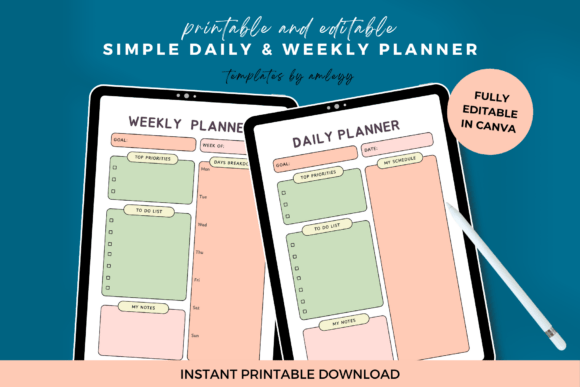
Simple Daily Weekly Planner Template
Let’s be honest: most planners either overwhelm you with blank space or drown you in rigid structure. You don’t need another to-do list that collects guilt. What you actually need is a Simple Daily Weekly Planner Template — one that fits your rhythm, not the other way around. It’s not about perfection. It’s about showing up consistently, seeing what’s due *today*, and knowing where your week stands — all without scrolling through five apps or flipping through three notebooks.
This isn’t a flashy productivity system with 17 color-coded categories. It’s a clean, editable Canva-based organizer built for real life — whether you’re juggling client deadlines while homeschooling two kids, prepping lesson plans between parent-teacher conferences, or launching your first Etsy shop between grocery runs and dog walks.
Where this planner works best — and why it sticks
You’ll reach for the Simple Daily Weekly Planner Template when clarity feels scarce. Not during “planning season” — but on Tuesday at 7:45 a.m., when your calendar says “Meeting,” your inbox says “Urgent,” and your kid just asked if lunch is packed. That’s when simplicity becomes strategic.
It lives well in places where friction slows you down:
- Your laptop while working remotely — Open the Canva link, type in today’s top 3 priorities, adjust time blocks as calls shift, and export a clean PDF to share with your team.
- Your printed desk copy beside your coffee mug — No battery, no notifications, just a clear visual of what needs attention before noon.
- Your tablet during school pickup line — Tap in tomorrow’s after-school pickup reminder, cross off yesterday’s library return, and add a quick note about that book club idea.
The design doesn’t compete with your thoughts. There’s no decorative border eating up margin space. No forced habit trackers demanding daily check-ins. Just calm white space, logical sections (morning/afternoon/evening + weekly overview), and room to write — not perform.
Real people, real moments — how it shows up across roles
A freelance graphic designer uses the daily view to block time for deep work (client revisions), admin (invoices, emails), and learning (watching one tutorial). She copies her weekly overview into a shared Slack channel every Monday morning — no formatting drama, just a plain-text summary of capacity and key deadlines.
A high school English teacher fills in the weekly grid with unit milestones, grading windows, and staff meeting dates. On Fridays, she uses the “Notes & Next Steps” section to jot down which students need follow-up — then drags those notes into her gradebook app the next morning.
A small-batch candle maker tracks production batches, Instagram story ideas, and shipping deadlines in the same template. When a craft fair registration opens, she adds it to the weekly view, sets a reminder in her phone, and uses the daily rows to break prep into manageable chunks: “Mon: photograph new scents,” “Tue: print labels.”
A stay-at-home parent managing therapy appointments, meal prep, and volunteer hours keeps the printed version on the fridge. The minimal layout means her partner can glance and instantly see who’s picking up whom — no decoding symbols or flipping pages.
What changes when you stop fighting your planner
Using the Simple Daily Weekly Planner Template isn’t about adding another task. It’s about reducing cognitive load — the mental energy spent remembering, rescheduling, and rechecking. One user told us: “I used to open my Notes app and scroll past seven unfinished lists. Now I open Canva, edit one screen, and close it. Done.”
That shift happens because:
- You own the format — Change fonts, swap colors, hide sections you don’t use. If “Evening Review” feels like pressure, delete it. If you need a “Gratitude Line” each day, add it. Canva makes that effortless — no design skills required.
- It adapts to your season — Busy semester? Use the daily rows heavily. Summer break? Lean into the weekly view for big-picture goals. Launching a course? Duplicate the template and rename it “Course Prep Timeline.”
- It bridges digital and physical — Edit in Canva, download as PDF, print at home or your local print shop. Or keep it fully digital: annotate with Apple Pencil, save versions by week, store in Google Drive with your other teaching or business files.
Before you download — consider your actual workflow
This template shines when you want control without complexity. But it’s not magic — and it won’t fix inconsistent habits on its own. Ask yourself:
- Do I actually review my plan more than once a day? If you only glance at your schedule in the morning, focus on making that daily view ultra-clear — not filling every row.
- Do I prefer typing or handwriting? The Canva version is keyboard-friendly; the PDF is print-optimized. Choose based on where you spend your focus — screen or paper.
- What’s my biggest planning pain point right now? Is it forgetting follow-ups? Overcommitting? Losing track of long-term projects? The Simple Daily Weekly Planner Template helps most when your struggle is *visibility*, not motivation.
Also: it’s intentionally uncluttered. If you rely on detailed time blocking, Pomodoro timers, or multi-layered goal tracking, pair this with a tool like Clockify or Notion — not replace them. Think of it as your anchor, not your entire ecosystem.
Getting started takes less than five minutes — and pays back fast
After purchase, you get a PDF with a single clickable Canva link. Click it. Sign in (or create a free Canva account — takes 30 seconds). You’re in. Text boxes are ready to edit. Colors shift with one click. You can change the header font, adjust row height, or add your logo in the corner — all drag-and-drop.
No tutorials needed. No “getting started” checklist. Just you, your priorities, and a template that gets out of the way.
That’s the quiet power of the Simple Daily Weekly Planner Template: it doesn’t ask you to become more disciplined. It asks you to become more present — with your time, your goals, and your day.